.jpg)
This overview course in Information Technology is directed at Entry Level Professional technical administrators, technical writers and configuration control officers.
Technical administrators, technical writers and configuration make use of computers to handle large amounts of data.
Before computers, managing large amounts of data involved index cards, filing systems and loads of paperwork.
When computers were first made accessible to all businesses, spreadsheets and word processors became the standard equipment for managing data. In fact in some older businesses, spreadsheets are still the primary resource.
The amount of data that we have to deal with on a daily basis has made it impossible to use the older methods of keeping track of information.
We now have super powerful machines, superb software and we are able to automate many of the processes.
Artificial Intelligence has made our lives a lot simpler but, in many respects, more complex.
It is however important to understand some of the fundamentals so that when things go wrong, and they do, you know what to do to sort out the problem and carry on.
A computer is a machine that receives information, processes it, and produces a result.
Every computer — from your mobile phone to a server in a data centre — follows the same pattern:
• Input: You give it instructions
• Processing: It works on those instructions
• Output: You get a result
• Storage: It keeps information for later
This simple cycle is the foundation of everything in IT.
We begin by identifying and explaining the basic computer components.
These components make up all computer systems.
Some systems have more of some components and some have bigger display units but essentially, they all do the same job.
Modern machines are much quicker than older machines and the only real limiting factors are the temperature at which the components can operate. If we can keep them cool, they can continue to operate at very high speeds.
Think of a computer like a small team, where each member has a job.
The case could be a tower or a laptop or it is your mobile phone and contains all the other components except for the peripherals.
If its a laptop, everything is very compact due to the need for conserving space and weight. A mobile phone is the same although much smaller.
The main unit in the case is the power supply. The power supply generates the various voltages required within the system. The power supply shapes stability, performance, component lifespan, and overall system behaviour far more than most people realise. Its impact shows up in both everyday reliability and high‑demand performance scenarios. Power supplies that run hot are not operating at their best. They are wasting energy and putting strain on processors and cooling systems.
The “brain.” The Central Processing Unit makes decisions, runs programs, and coordinates everything.
The CPU is the single unit that does the processing of all data within your computer. The speed of the CPU is measured in Gigahertz. The higher the frequency, the faster the computer.
In more modern computers there are often multiple processors often expressed as dual core or quad core. These work in parallel, each carrying out instructions simultaneously. This allows processor speed to be increased substantially.
You won’t notice this if you are using something like a word processor or a simple spreadsheet program which doesn’t require a lot of speed. If you are using complex graphics, video and audio then the processor has to carry out a lot of instructions very quickly so increased speed is visible in the performance.
The “short‑term memory.” The RAM is memory that is used during operations – it is almost a scratchpad on which the computer temporarily stores information before carrying out an operation on the information and finally storing somewhere more permanent. A computer with more RAM has the ability to carry out complex manipulations very quickly whereas a smaller amount of RAM could create a bottleneck and slow the system down.
It holds information the computer is actively using.
More RAM = smoother multitasking.
The “long‑term memory.” The hard drive is memory which is more permanent than RAM. The hard drive is used to store applications and data. A large and fast hard drive is necessary to store large document and graphics. The speed of the hard drive will determine how quickly you can retrieve information that is stored.
This is where your files, apps, and system live.
SSDs are faster and more reliable than older hard drives.
Input/output devices determine how you communicate with the computer — and how it communicates back.
Input: keyboard, mouse, webcam, microphone
The keyboard and mouse are referred to as the primary input devices.
Output: monitor, speakers, printer
The monitor is the primary man-machine-interface. It is the main device that allows you to see what is going on. If you work extensively with graphics, a large high resolution monitor is necessary. If you work with multiple documents, then having two monitors in split-screen mode will allow you to see two documents or more simultaneously.
Ports and connections: USB, HDMI, audio jacks, power ports and more
Wireless connections: WiFi, Bluetooth and others such as GSM, LTE etc.
In cases where computers are used for specialised tasks such as monitoring motor vehicles on a tracking system or driving the devices necessary for an flight simulator, special cards may be required. These fit into specially provided slots on the motherboard. Some of the expansion devices use so much power thatthey are supplied with their own cooling fans.
Video card
Audio card
Network card
Modem
Motherboard/mainboard
System cooling
Case fans
CPU fans
Liquid cooling
Category |
Power |
Portability |
Upgradeability |
Typical use |
|---|---|---|---|---|
Desktop |
High |
None |
Excellent |
Office, home, gaming, professional work |
Laptop |
Medium |
High |
Low |
Students. remote work, travel |
Mobile |
Low to medium |
Very high |
Very high |
Communication. light tasks |
Workstation |
Very high |
None |
Excellent |
CAD, 3D, scientific workloads |
The Operating Syste (OS) is the software that runs everything.
The operating system is a special piece of software that supports the basic functions of a computer.
Essentially it is the set of instructions which tells a pile of electronic components that it is now a computer and instructs it how to perform basic operations.
The operating system will tell the electronics how to talk to peripherals, how to execute applications and it will schedule specific tasks.
There are many operating systems amongst which Windows, Linux, and macOS.
The way you store your files and folders and manage your storage, separates beginners from confident users.
Imagine a library. Lots of shelves and on each shelf lots of books.
And in each book, lots of pages. And on each page lots of words arranged into groups.
That is exactly what the computer storage system looks like.
Pages of data, a document, picture, or program are stored in files.
Files are stored in folders which are a container for files.
Folders are stored in a storage location also called a drive. The drive could be the C: drive on your computer:, a USB thumb drive or a storage location in the cloud.
If you can manage your information by successfully naming and grouping data, you can manage your work.
Each collection of information is grouped into a file. That file is given a name.
File names must be formatted according to the rules for filenames.
Information can be as simple as a one paragrph document or as complex as a 450 page spreadsheet.
Data is stored in many different formats, each format being represented by a filename extension.
Documents compiled in MS Word have a filename extension of .doc or .docx
Excel spreadsheet files have a filename extension of .xls or xlsx
Pictures and images are stored with a .jpg or .png filename extension.
And there are many more different extensions to learn about.
The secret to storing data is to name it in such a way that it is unique and can be easily retrieved.
New users store everything in one location and give the documents arbitrary names which have no meaning for anyone but themselves.
Simple disciplines can make life a lot easier.
Consider that you might create ten different documents on a single day. That day is unique and can be named, for example, July 4, 2025. This doesn't really assist because a search for July will retrieve many documents. But if we write the date as 20250704 we have created a unique number that no other day will ever have.
To this date we then add a number for each document created on that day. Document number one for the day would be 20250704_01. The second document would be 20250704_02 and so on.
Now if we go and look for a letter that we wrote on a specific day, the search is so much easier.
We can make it more user friendly by added a few descriptive words after the unique identifier, for example 20250704_02 User Manual Blue Dishwasher.
This facilitates a search for the date, the type of manual, the type of equipment and the colour of the equipment.
A clever documentation manager might write the number as 20250704_02 UM BD and everyone on the team would know which document he is referring to.
Knowing how to install and remove software keeps your system clean and secure.
If you are in a company environment, your system administrator will look after many of these functions.
If you are a free agent or working on a home system, there are some simple rules to follow:
• Use trusted sources - don't just download something because someone sent you a link or it offers something for free.
• Follow on‑screen instructions - you will be surprised at how many installs dont work properly because over confident users don't read the instructions.
• Avoid “Next, Next, Next” without reading and understanding.
Equally important, uninstalling software has some rules
• Use “Add or Remove Programs” from within your operating system.
• Never delete program folders manually - many installations install code in places you might never get to, the uninstall functionality for each software application is different and it knows what to uninstall.
Updating software is always tricky - shall I do it or shall I give it a miss?
There have been so many bad updates that we are all a little wary of whether to update or not.
The best policy is to keep your operating system up to date.
Keep your apps up to date. Good developers are constantly improving and adding functionality.
The tools of the modern office include word processors, spreadsheets and presentation applications.
Word Processors:
• Create documents
• Format text
• Export to PDF
Spreadsheets:
• Create tables with cells, rows, columns
• Calculate using formulas - some formulas are very simple, others are extremely complex
• Sort and filter data - best done when the data has been captured correctly
Presentations
• Create slides to reveal data and graphs to a meeting
• Create special layouts which respond well when displayed on screen, on mobile or when printed
• Create images and charts with animationProprietary software - this is software designed and built specifically for your particular environment.
This could be for an estate agency, a sports club or a gym, or for an engineering company capturing text and drawings.
To understand how software systems interact with one another, consider how a vehicle tracking company must operate.
Take on a new customer
Capture information about the customer's vehicle and the service required
If a tracker must be supplied and fitted - send a works order to the technical department - they must order in the equipment and schedule an installation date
Set up the billing and send an invoice to the customer's email
Send a notfication to the accounts department - they must open an account and accept payments
Complete the administrative tasks
Switch on and go live in the monitoring centre - they will have a special application which allows them to see a map on screen
Monitor the vehicle in amongst thousands of other vehicles, all sending position and alarm status back to the monitoring centre
If a vehicle is stolen or hijacked, an alarm signal is received
Despatch security or recovery teams
Follow up and close the alarm
This is not all the functions, but you can see that there is potential for some very complicated software behind the scenes.
Professional communication has changed dramatically over the last few years.
Email is the backbone of office communication. This is augmented by mobile apps such as WeChat and WhatsApp.
There are some core skills which we need to be able to function in the communication world.
• Composing an email or instant commuication - we can say a lot as in an email or we need to keep it short and concise in an instant message
• Reply vs Reply All - this is an area where we see mistakes quite often - instead of sending a response to a single person we send it to everyone
• Attaching files can sometime be a bit of an adventure - files can be too big, the wrong format, infected with malware and more. It is often a lot more effective to send large files with compression or using cloud links.
• Use CC and BCC - carbon copy and blind carbon copy allow us to send mails to some people, without others knowing that they have also received the communication.
• Email etiquette - this is always difficult and many people just don't get it right - using abbreviations and colloquial language does not do well in a business environment.
The browser is your gateway to everything online.
The browser is the tool that you use to gain access to the internet
There are a few key concepts which you should know about in order to get the full benefit of your browser.
We all know Google Chrome, Microsoft Edge, Mozilla Firefox and Safari.
But there are many more and some of them are really special in that they give access to specific data only.
The browser has some very specific and intricate tasks which include opening the web site, displaying the data, manging bookmarks and downloads, handling security.
A search engine is something entirely different. It lives inside thebrowser and helps you find information.
So although we talk about Google Chrome, Google Search is resident and busy.
Some other search engines are DuckDuckGo, Bing and Yahoo.
We can give the search engine some keywords and it will go and search other web sites for associated information.
Search engines will assist in discovering other web sites and possibly guide your search for more detailed information.
In cases where the research has already been done and we have a URL - Unique Resource Locator - we simply type it into the browser and it goes directly to the site.
Some browsers are able to manage simultaneous access to multiple web sites by using tabs. Each tab can be connected to a different URL A tab is effectively a container for a web page.
The URL effectively tells the tab what to load.
In some cases the quantity of data available at a URL is so large that it cannot be displayed meaningfully. In a case such as this, the data is made available in an alternative format such as a PDF file. A button on the screen will indicate thatthe page can be downloaded. When tyou click the download button, the browser will ask you to indicate where the file should be placed on tyour computer.
Sometimes, you will want to retunr to that specific page to see if it has been updated with new information. Instead of going through the search again, you can save a bookmark. This is available in your browser and a single click will take you straight back to the URL.
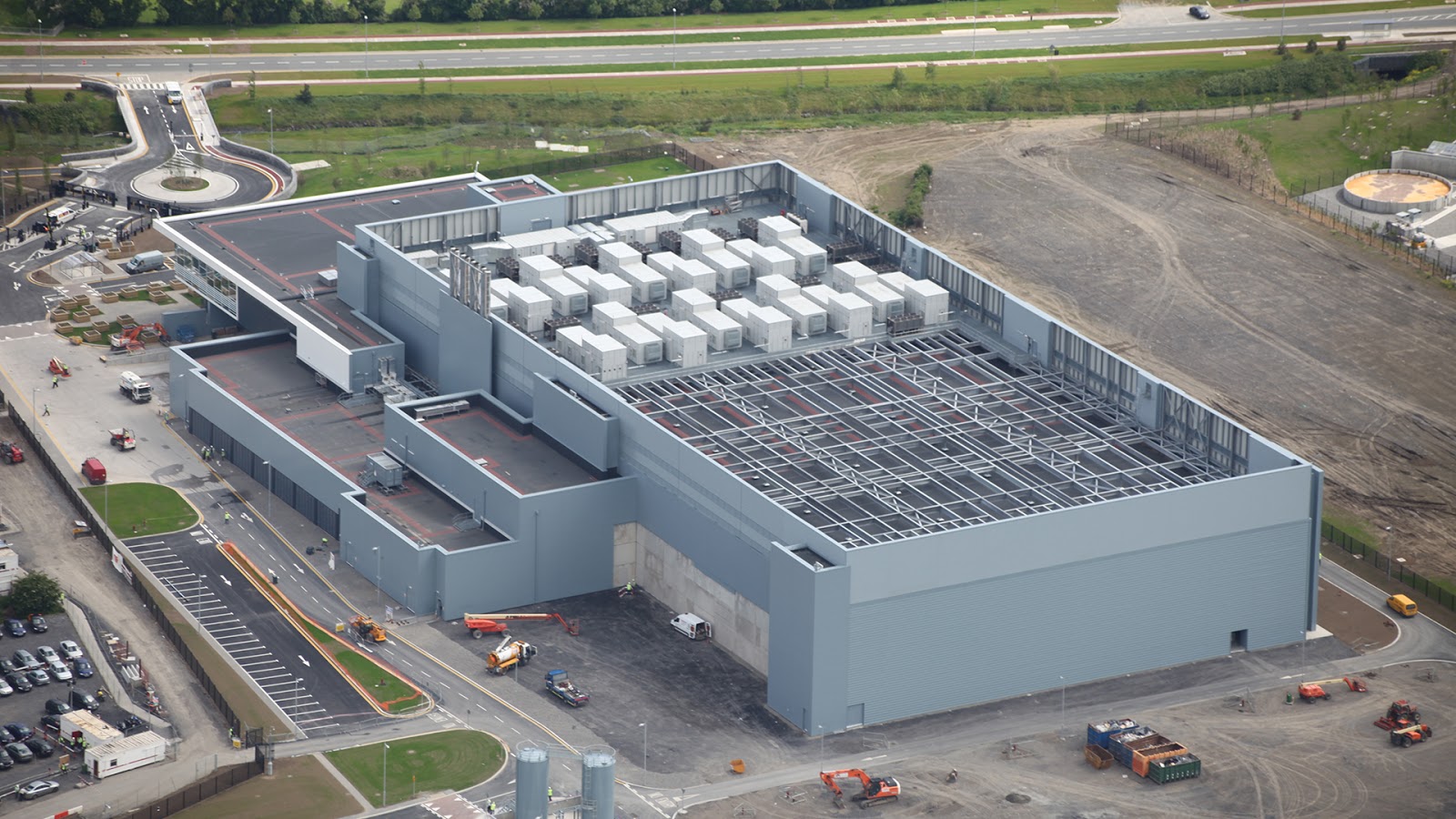
This is the Windows Azure Data Centre in Dublin, Ireland. This is a cloud storage data centre.
Hundreds of data servers all housed in one site and making data available to thousands of users simultaneously.
Cloud storage allows you to store your data and then access your files anywhere at any time.
Cloud storage keeps your work safe and accessible.
Cloud services are provided by many different companies with AWS, Azure, and Google Cloud being the most well known.
There are different cloud deployment models amongst which IaaS, PaaS, and SaaS
We will look only at the basic cloud infrastructure and management
Applications are hosted online. This means they are "living" on someone else's server. This saves money in that the equipment is not purchased, and housing the equipment is not necessary. A dedicated technician is also not required.
SaaS (Software as a Service) is a model where the service is paid for on a per user per month basis, so no large capital outlays are required.
Storage is hosted online and off-site where it is safe and secure.
It is much cheaper to rent part of a server than it is to buy the server and only use part of it.
This solution needs a high speed internet connection to run efficiently
Companies and individuals must ensure that they can get all their data back from the supplier if they choose to change vendors.
Some core skills are required in order to manage off-site data.
These skills include Uploading, Downloading, Sharing and Syncing
What is a backup? A back up is a safe copy of your important data so that you don't lose everything if something goes wrong.
There are many different types of back up, but simply, it is a copy of your data. It could be a small section of really important data or it could be your entire system with all your files, and settings.
In some environments, back up control is managed by the IT Department. Backups happen at a predetermined time every night. Users designate what they want backed up or alternately, the entire system is replicated. In some cases the systems are intelligent enough to only store the changes to data - so it is not necessary to back up data which has not been touched since the last back up. This saves time and processing power.
If, however, you are a private individual, then back ups are your responsibility. We are all guilty of not doing back ups and then getting caught when the pwer goes down and a hard drive crashes. Best to have a plan in place and ensure you have a copy of your most precious stuff - like wedding photos and similar.
There are economical solutions available for home office use or more expensive and very versatile solutions for the corporate environment. A simple flash drive will do the job if the amount of data is small.
Network tools include external hard drives, NAS or RAID arrays where data is replicated continuously.
Micorosoft OneDrive is currently the cheapest option for a basic file backup.
Even though we take precautions, there are occasions when data is lost through no fault of our own.
A hard drive crash is probably the most common dataloss scenario, but even more simple, the SD card in a camera can go faulty and all the photos from your overseas trip are mysteriously lost.
Fortunately, data recovery is big business and there are special tools and a range of skills which are able to recover data.
Data is stored in many different ways. Thes include hard drives, solid state drives, flash drivesand SD or memory cards.
It is worthwhile to know that data that is lost or seems to be deleted is not necessarily gone for good. The way files are deleted is not by erasing the entire file but just changing a label at the begining of the data file. This tells the computer that the marked file is not required and the space is available and can be overwritten. All we have to do is find those labels and change them back again. That sounds very simple and if we get lucky it is - but sometimes it is a lot more complicated.
What happens when we have a system crash? We must determine early whether the system crash is hardware-based or software-based. Software needs a very different approach to hardware. Hardware-based data recovery will normally happen in a sterile clean room environment where the drive is dismantled and hopefully the data will be recovered. The important thing here is to avoid switching the power on and off to see if the hard drive doesn't miraculously repair itself. Every flip of the switch has the potential to cause more damage. If it is suspected that the problem is software related, and this is normally well understood by the person who accidentally deleted the files or formatted the drive our somehow corrupted the data, then a software solution can be attempted at the desk top.
We can prevent data loss by ensuring that we have adequate and proper back up solutions and processes in place. Back ups must be automatic, stored in more than one location and they must be tested to ensure that the back ups are valid.
Where data such as software is being written on a daily basis, proper version history must be implemented. This will avoid last week's working version being overwritten by this week's faulty version.
A computer netowrk consists of a group of special devices connected so thatthey can share data and associated resources.
The connected devices follow specific rules called protocols to ensure that communication is accurate and secure.
Understanding how computers talk to each other and having some networking knowledge helps you troubleshoot and stay connected.
A network connects many computers together via communication links. These links can be wireless or cables or fibre.
Cables come together in routers, hubs and switches (nodes) so that data is able to find a suitable pathway from one computer to another.
In this way resources such as printers can be shared by several users on the system.
Wired networks tend to be much faster than wireless networks.
Fibre networks are even quicker.
The components of a network ensure connectivity, making a path for data to travel between devices.
Networks can be seen as wide area networks (WAN) or local area networks (LAN).
A router will connect multiple networks. Your home or office might be one network. The internet might be another network. Your bank still another network.
The connectivity is ensured by the transmission media which could be fibre, satellite, cable etc.
Your equipment gains access to the nework via an access point for Wi-Fi or by a wired socket RJ45 and Ethernet cable ir similar.
Each device on the network has it's own unique address called an IP aaddress.
This allows us to communicated directly between devices.
To ensure even greater security and privacy, a Virtual Private Network (VPN) furrther insulates one access point from others and binds it directly with another devices.
Cyber security is all about staying safe in a digital world.
The internet is everywhere and just like a huge spider web covering the planet, as you walk along, some of it is bound to touch your face.
The problem is, the spider is probably just as close too.
The Internet of Things (IoT) and the advent of the "cloud" has ensured that the web covers all the corners of the planet and at the same time it has created a range of vulnerabilities that are targeted by attackers.
Small businesses, large corporations and governments must continually be aware and protect against hackers and large scale data breaches.
This is further complicated by staff having access to sensitive information and in extreme cases, selling that information to opposition companies.
There are essentially three areas of IT security that are of interest. These are network security, internet security and endpoint security.
| Network security | Internet security | Endpoint security |
|---|---|---|
| Servers | SSL Certificates | Computer security |
| APIs | HTTPS | Encryption |
| Databases | OAuth 2.0 | Mobile devices |
| Applications | Cloud | |
| Firewalls | Web sockets | Users |
| Wireless network | VPNs | |
| Malware |
Network Security depends on the system administrator and his skill in building a network that is impervious to attack.
Using both hardware and software, the sys admin is able to restrict access to the organisation’s network both internally and externally.
Within the internal environment, the sys admin can restrict access to specific areas and to specific users of the network.
One of the primary areas of concern is data theft. Employees that are on their way out invariably access the customer database and make a copy.
Similarly, company price lists and supply sources are extremely valuable.
Internet Security limits attacks on your system that originate outside your organisation.
This is normally done by installing anti-virus, anti-malware and anti-spyware software.
It is further enhanced by ensuring that data is encrypted and that passwords are safely stored and encrypted.
There are various protocols which include encryption.
Within the Internet Security environment, we must consider cloud security as an almost separate issue.
The versatility of machines and the cloud technologies allow for data to be housed, processed and stored off site.
The level of security between the users and the cloud must be proportionally greater to resist attacks.
Endpoint Security is often referred to as the weakest link.
This is because users are often unaware that they are the subject of an attack.
Something as simple as letting your password be known to a stranger can give them access to the most important company data.
IT Security is a constantly changing environment. Most security risks come from human error.
Key concepts that you must be aware of are:
• Passwords and Multi Factor Authentication (MFA). Learn how to enable MFA on one account.
• Phishing Be aware that clicking links in unexpected emails can open a door to all sorts of problems
• Safe browsing - dont access sites which are largely unknown.
• Suspicious files - don't download files from unknown sources.
• Data privacy - keep your data and passwords close to you
In 1995, Newsweek magazine published an article in which they said that the internet was just a fad and the idea of cyber business was written off completely.
Fact is, they were wrong and things have changed and grown substantially.
We can now communicate with suppliers on the other side of the planet in a split second and place orders with a single click.
The amount of business that is done over the internet is astounding and is worth billions of dollars.
Social networks consist of a network of social interactions and personal relationships made possible by high speed electronic communication.
Four our discussion, a social network is a dedicated website or other application which create a virtual community, and enables users to communicate with each other by posting information, comments, messages, images, etc.
Social media uncludes a collection of online communication channels that are dedicated to communities and the associated communication and intercation. The interaction may include the transfer of information, pictures and vocie recordings.
Different types of social media enablers are web sites, chat groups, special applications such as blogging and vlogging forums, and at the more mundane end of the spectrum, wikis and knowledge bases.
The world has achanged and the way people communicate has changed with the growth in social media platforms such as email, Facebook, Twitter, Instagram, X, LinkedIn, Google+, Wikipedia, Pinterest and many more.
Platforms now offer advice, products and services, enable communication with employees and have become a vital art of doing business.
Companies that have not embraced social media have found that market share declines significantly.
Social media is used to drive users to web sites by the use of hyperlinks.
The figures below give an idea of how FaceBook has managed to grow its user base over the last ten years. Each of these users is a potential customer for any goods and services advertised on FaceBook
Year |
Estimated Monthly Active Users |
|---|---|
2025 |
3.09 billion |
2024 |
3.07 billion |
2023 |
3.05 billion |
2022 |
2.96 billion |
2021 |
2.91 billion |
2020 |
2.80 billion |
2019 |
2.50 billion |
2018 |
2.32 billion |
2017 |
2.13 billion |
2016 |
1.86 billion |
There are more than 2.7 billion discreet uses of YouTube every month.
Social media drives more traffic to web sites now than search engines do.
Social media has the potential to bring huge benefits to any business, but it also has the potential to be very risky where its use is not properly monitored and protected.
Many businesses are finding that a social media presence is vitally important to their businesses. Withdrawing from social media could risk market opportunities.
That said, businesses must be aware and make their employees aware of the risks inherent in using social media.
Human error is the most common danger. A simple click on a phishing email or inadvertently posting a risqué image constitute the most common human errors.
Either of these can force a company to incur both huge financial losses and the costs of repairing the damage to company image.
Social media users are normally in a very relaxed state of mind when using the channels. This leads to loss of attention and allowing virus infected emails to be received which in turn start to send messages seen as spam onto corporate networks and to customers.
Malware, spyware, adware and ransomware are all over the internet. These malicious bits of code are spread through social media. Image files such as jpegs can easily accommodate embedded malicious code which can cause untold damage to a company.
Whatever is published is in full view of everyone.
Mentioning what you are doing at work to an online friend may contravene company regulations. In extreme cases this could be seen as industrial espionage or giving away company secrets.
Things that are published go viral very quickly.
Sharing information takes one click. A confidential remark can quickly become common knowledge. Mention your boss or a colleague and you probably don’t need to return to work the next day.
Once it’s out there, there is very little chance of pulling it back and it’s out there forever.
You might instantly regret having posted something and want to claw it back. The problem is that items posted travel at the speed of light and it only takes one person to do a quick screen grab, and you are toast.
If privacy settings are not tightly controlled, it is relatively easy for a hacker to take control of a brand’s marketing channel and past all sorts of fraudulent and misleading information.
At the outset, somebody must be in charge and in control of social media channels. This could be the company IT person from a network and equipment access point of view. But where the actual material is concerned, this is more likely to be a tech savvy marketing person.
Companies must create and maintain a social media policy. A social media policy will detail best practices, safety and security guidelines, and procedures on training and enforcement.
Some guidelines might include:
Avoid malware and related malicious software (spyware, ransomware, etc.)
Avoid spam, phishing attacks, and human error
Create a secure password
Effectively monitor and engage with brand mentions
Engage on social media following a corporate crisis
Proceed in the event of malware attacks
Share on-brand and approved content
Social media training
Personnel are trained in the latest methods and software and shown how to recognise and deal with social media breaches.
Limiting access to social media
Ensure that as few people as possible have access to social media that interfaces with the world outside the company.
If personnel need to access social media they should do that with their own devices and not on company equipment.
Publications that must go out on social media can be directed though one or two controlled channels.
Monitoring of social media by the person in charge. They must constantly be aware of the interactions happening on social media. This will allow any deviations, positive or negative, to be quickly controlled.
We cannot escape the fact that we are all working in a digital space.
We have so much information at our fingertips and more keeps coming.
It all comes down to working smarter and not harder.
It is a fact that technical offices rely on efficient digital habits.
These are core skills which all technical workers will have to embrace at some stage. And while these sound trivial and more of a chore than anything else, in the long run they will save a lot of effort.
• File naming conventions - in companies that do not have a convention, it is probably a good idea to start one
• Version control basics - knowing which is the latest version of a document is of paramount importance
• Using shared drives - in many cases, data is held in one repository and multiple users have access. This is a recipe for chaos if not well managed.
• Logging support tickets - when something goes wrong, or right, it must be documented with date and time and managed accordingly.
• Reading error messages - we have not evolved in the arena of error messages. Many of us have a habit of just clicking YES when a message appears. We must stop and read and think before clicking the message away.
Data is stored in databases. Databases can be structured in different ways dependent largely on the nature of the data.
Structured information is data that is organised, predictable and most importantly, machine readable.
Data is stored in line with rules so that humans and machines can access the data, store it, query it and analyse it efficiently.
Prior to data being captured, a schema is created which determines what fields exist, what type of data is stored in the field, and how the fields relate to one another.
For example a doctor has a patient who has an account number and an outstanding balance.
| doctor_name | patient_name | account_number | balance |
|---|---|---|---|
| smith | john | 1357 | 121 |
| smith | robert | 2468 | 0 |
| smith | william | 1458 | 76 |
With this structure we can easily search for all Doctor Smith's patients, or all patients name Robert, or all patients with a zero balance.
We could search for all of Dr Smith's patients, who are named Robert and have a zero balance.
Each row of data has one piece which is a unique identifier, in this case the account number. There may be two Williams but they will have different acount numbers.
The way in which data is referred to allows us to understand data types and structures more clearly.
Each row in the table is a record.
Each column is an attribute of that record.
Attributes indicate the type of data stored in that particular cell. Attributes can be text, integer, boolean, etc.
Data analysts are able to design and build databases or use software to extract data in meaningful formats.
For many of us who are not in the business of programming computers, the way computers work is a huge mystery.
Fact is, it is not that difficult and learning to program is just about learning a new language.
It is all about logic. Understanding logic helps you automate tasks and think like a problem‑solver.
For computers, there are only two answers to a problem, either a yes or a no.
The computer looks at each situation and decides, is it this or is it that?
Is it red? If the answer is No, look at the next colour. If the answer is Yes, then do the next instruction.
So for an electric car, checking the traffic light is quite simple. Is the light red, if yes, then apply the brakes. If no, then keep going.
We can also see this as an if then function. If the first statement is true then do the next instruction.
All problems can be solved in this way.
Where problems are repetitive, with the same situation arising often, then we need a recipe for solving that problem. This is called an algorithm.
Where the variables (things that change) are different with each situation, but a decision must be made, the algorithm tells us how to make the decision.
Different inputs are managed in different ways to create outputs that are usable by humans.
This is done in the man-machine interface. The keyboard is the input and the screen, or printer, is the output.
If we have machines which monitor inputs autonomously, and generate outputs according to the rules of the algorithm, we call this automation.
Artificial Intelligence (AI) is a technology where computers learn from information that is already available, and then make seemingly smart decisions or compile documents in a split second.
If you didn't know better, you might say that the machine had a brain.
AI allows apps (applications), robots and many other devices to make decisions.
These decisions are based on pattern recognition, problem solving algorithms, specific inputs from sensors and often by asking for answers from operators.
There are many benefits in using AI but one must bear in mind that the AI environment does not think or feel like a human. It can help accomplish tasks at a much faster rate and with access to a much larger pool of information that we humans might not have access to.
As with all tools, it must be used responsibly. There is always the attraction of using AI to do human tasks and then having the human take credit for the outcome.
We must be careful, in these early stages of AI development, of using the AI output in an "as is" format. AI does make mistakes.